Binance gift cards have become a popular way to share crypto with friends and family, offering a secure and convenient method to introduce others to digital currencies. Plus, they are versatile as they can be redeemed for different cryptocurrencies, like USDT (USD Tether), USDC (USD Coin), Bitcoin (BTC), or other tokens supported by the platform.
Whether you’ve received one or are planning to use one, this article will walk you through the two ways to redeem your gift card on the Binance app. Let’s get straight into it.
Two Ways to Redeem a Binance Gift Card
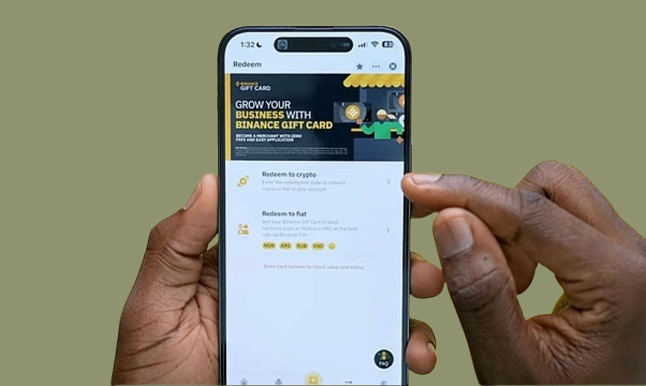
If you buy a Binance gift card or have received one, you can cash out its value or convert it into cryptocurrency. Whichever way you want to go about it, Binance provides easy options for redeeming your card. They are:
- Redeem to crypto
- Redeem to fiat
How to Redeem a Binance Gift Card for Crypto
To redeem your Binance gift card for crypto, follow these steps:
- Open the Binance app and log in to your account.
- Tap the profile icon located at the top left of the homepage.
- Select “Gift Card” from the menu options.
- Tap the “Redeem” button at the bottom of the screen.
- Choose “Redeem to Crypto“.
- Paste your gift card’s redemption code in the provided box.
- Tap “Confirm,” and the cryptocurrency will be instantly added to your funding wallet.
How to Redeem a Binance Gift Card to Fiat
To convert your Binance card into fiat currency, follow these steps:
- Open the Binance app and log in to your account.
- Tap the profile icon at the top left corner of the homepage.
- Choose “Gift Card” from the menu.
- Click on “Redeem” at the bottom of the screen.
- Select “Redeem to Fiat”.
- Paste the redemption code and click “Next”.
- You will be directed to sell the gift card via Binance’s P2P trading feature. You can choose to use express P2P to be instantly paired with a buyer or find a buyer yourself from the pool of buyers.
- Once sold, the buyer will transfer the money directly to your bank account.
These two methods make it simple to redeem your Binance gift card for crypto or cash, depending on your needs.
Common Issues When Redeeming a Binance Gift Card
Here are some of the most common error messages you may get while trying to redeem your Binance gift card:
1. Error message: Gift card already redeemed
Solution: Check your wallet history, as the card might have been previously used.
2. Error message: Incorrect Code
Solution: Check that you correctly added the 16-digit gift card code, including the placement of the number and digits. Also, confirm that you’re not mixing up the voucher number with the gift card code.
3. Error message: Gift Card Already Added
Solution: Go to the “Card History” section within the “Gift Cards” section of the app to redeem it directly.
Tips for Redeeming a Binance Gift Card
When redeeming a Binance card, consider the following tips:
- Validity: Ensure your gift card is still valid by checking its expiration date. You cannot redeem expired gift cards.
- Redemption code: Enter the redemption code carefully and double-check for accuracy to avoid errors during redemption.
- Currency: Confirm the currency in which your gift card is issued and redeem it in the correct currency.
- Platform restrictions: Verify that the gift card is intended for Binance and can be used on their platform. Some cards may have limitations.
- Verify the sender’s identity: this is especially at the point of purchase or when exchanging your gift card for fiat. Purchase your gift card only from trusted vendors or the Binance website to ensure the authenticity of the gift card. Anything short of this can lead to you being scammed when trying to get a gift card.
- Never share your redemption code: This is another common gift card scam where you’ll be asked to share your gift card code in exchange for help purchasing crypto. The Binance website has many clear guides on using the platform, which even a beginner can understand. So, avoid sharing your redemption code with third parties to avoid losing it.
- Adopt all security measures: Enforce all available security measures like two-factor authentication or an anti-phishing code to protect your account from being hacked or to identify genuine info from the Binance team.
- Support: If you encounter issues, contact Binance customer support for help with troubleshooting or guidance.
Frequently Asked Questions About Redeeming Binance Gift Cards
- What kind of gift card can I redeem on Binance?
You can redeem cards that are specifically designed for the Binance platform. If you have other types of gift cards, like retail or gaming gift cards, you can’t redeem them directly on Binance. However, you can trade them on gift card trading platforms like Nosh.
- How do I redeem a Binance gift card in Nigeria?
To redeem a Binance gift card in Nigeria, log in to your Binance app, click on the profile icon, and select “Gift Card.” Then, click “Redeem” and enter your code. You can choose to redeem it as crypto, which will be added to your Binance wallet, or as fiat, which can be sold via P2P trading to receive Naira in your bank account.
- Do Binance gift cards expire?
Yes, Binance gift cards created on or after April 10, 2024, have a 6-month validity period from the creation date. Always check the expiration date on your card before attempting to redeem it.
- Are Binance gift cards refundable or exchangeable?
No, Binance gift cards are not refundable or exchangeable once redeemed. Make sure to double-check all details before completing the redemption process.
- Can I redeem partial amounts on a Binance gift card?
No. Binance gift cards have a one-time use feature, which means you’ll have to redeem the entire value of the gift card at once.
Conclusion
Redeeming a Binance card is a quick and convenient way to access cryptocurrency or fiat currency through the Binance platform. Just verify that the card is meant for use on Binance, check the card’s validity, and enter the redemption code correctly. Following the steps outlined in this guide ensures a smooth experience.
If you have other types of gift cards that can’t be redeemed on the Binance app, consider trading them on Nosh. Create a Nosh account today to buy and sell your gift cards easily.