Walmart gift cards are favorites for a reason. As one of the most popular options in the United States, they make shopping effortless and convenient, with thousands of items available—from groceries and kitchenware to electronics, clothing, and household essentials.
Whether you received one as a gift or bought it for yourself, keeping track of your gift card balance is imperative to plan your spending and avoid awkward moments at checkout.
Are you trying to find out how much is left on your Walmart gift card? You’re in the right place.
This guide will show you how to check the balance on your Walmart gift card in a few simple ways, plus tips for troubleshooting any issues you might face.
Let’s get started!
Different Ways To Check A Walmart Gift Card Balance
There are three (3) ways you can check the balance on your Walmart gift card. Choose the one that is most convenient for you.
Option 1: Through the Walmart Website
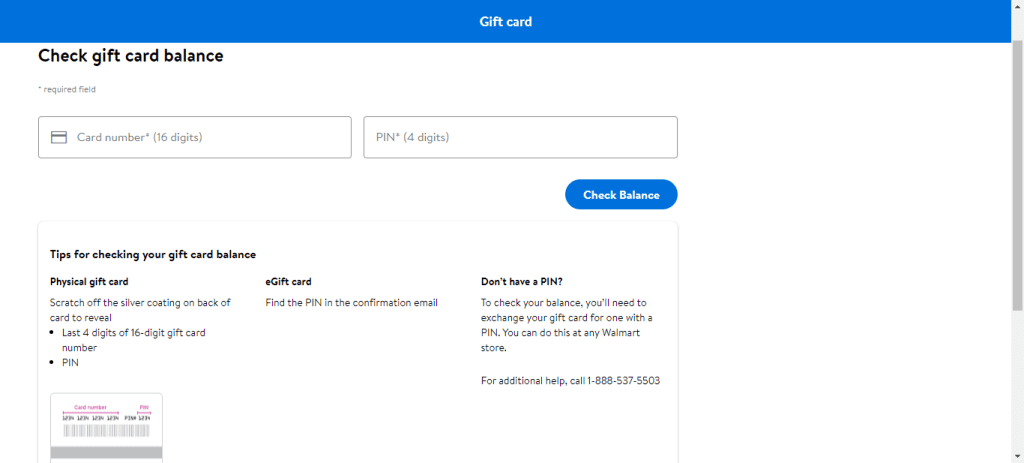
Checking your balance online is one of the fastest and easiest methods. Here’s how you can do it:
Once you submit the information, your balance will be displayed immediately.
This method is perfect if you want to verify your balance quickly before shopping online or visiting the store.
Option 2: By Phone or USSD Code
If you don’t have simple access to the internet or prefer a more traditional method, you can check your balance by calling Walmart’s customer service line. Here’s what to do:
- Find the customer service number printed on your gift card.
- Dial the number on your phone.
- Follow the automated voice prompts carefully.
- Enter your gift card number and PIN when asked.
The automated system will read your current balance aloud, making it a handy option while traveling or dealing with slow internet connections.
Option 3: At a Walmart Store
If you’re already planning a trip to Walmart, you can check your gift card balance right there in person:
- Take your Walmart gift card with you to the store.
- Visit the cashier or the customer service desk.
- Let them know you want to check your gift card balance.
- Provide your card number and PIN if asked.
- The staff will scan your card and share your balance within a few minutes.
Checking your balance at the store can also allow you to ask questions or get assistance if you notice anything unusual with your card.
Troubleshooting Tips
Occasionally, you might encounter small issues while checking the remaining balance on your Walmart gift card. Here are a few quick tips to help you troubleshoot:
- Double-check your details: Ensure you entered the correct 16-digit card number and PIN.
- Confirm activation: Make sure your gift card was activated when purchased. An inactive card won’t work until it is activated.
- Clear your browser cache: If the balance checker page isn’t loading correctly, try clearing your browser’s cookies and cache, then refresh the page.
Reach out for help: If all else fails, contact Walmart’s customer service at 1-800-925-6278 for assistance with card-related issues.

What To Do After Checking Your Balance
Choosing what to do next depends on your needs, but knowing your balance first puts you in control. After confirming your balance, start using it right away!
There are several fantastic ways to make the best use of your Walmart gift card:
- Redeem it: Use your card to shop for items at any Walmart store or online. Just present it at checkout like you would with a regular debit card.
Read more about redeeming your Walmart gift card online.
- Gift it to someone else: Gift cards make excellent presents. If you’re feeling generous, you can easily pass yours along to a friend or family member who might need it more.
- Sell your Walmart gift card: If you don’t plan to use the card, you can exchange it for money. In Nigeria, Nosh is a trusted platform where you can sell all kinds of gift cards quickly and securely.
You can download the Nosh app from the Play Store or App Store, or sign up through the Nosh website.
Before we wrap up, let me quickly answer some common questions you might still have about checking and using your Walmart gift card.
Frequently Asked Questions About Walmart Gift Cards
- Can I check the balance on my Walmart gift card without a PIN?
No, you need the card number and the PIN to check your balance online or by phone. The PIN is under a scratch-off panel on the back of the card.
- Do Walmart gift cards expire?
No, Walmart gift cards do not expire. You can use the balance whenever you like, and there are no hidden fees for holding onto the card long-term.
- What should I do if my Walmart gift card is not working?
First, double-check that you have entered the correct card number and PIN, and then ensure the card is activated. If problems persist, contact the customer service team at Walmart at 1-800-925-6278 for assistance.
- Can I use a Walmart gift card online and in a store?
Yes! You can use your Walmart gift card to shop online and at any Walmart physical store.
- Where can I buy a Walmart gift card?
You can buy a Walmart gift card online from Nosh. Other kinds of gift cards are also available for purchase at incredible rates.
Conclusion
Checking your Walmart gift card balance is simple and takes just a few minutes, whether you choose to do it online, by phone, or at a store.
I’ve walked you through each method, along with troubleshooting tips to make the process much smoother.
Always remember to verify your gift card balance before you shop. It’s a smart way to manage your spending and avoid surprises at checkout!